
A few years ago I built AI image tagging, smart cropping, and alt text generation by hand. It was a custom Sitecore field wired to Azure Cognitive Services. It worked and it saved real time. Today the platform ships all of that natively inside Content Hub, grounded in your own taxonomy, and I no longer have to maintain a line of it.
I bring this up because it changes the question. When a capability moves from "something a good team can build" to "something the platform does on upload," the interesting decision is no longer which DAM has the longer feature list. Most mature DAMs converged on the same table stakes: storage, a metadata schema, renditions, rights and expiry, search, and CDN delivery. If you score vendors on that grid, almost everyone passes.
So the comparison that matters is architectural, not feature by feature. Is the DAM a passive repository that other systems pull from, or an active participant in your content operations? And when the marketing says "AI," is that AI grounded in your taxonomy and your brand, or is it a generic vision model labeling pictures? Those two questions separate a traditional standalone DAM from what Content Hub DAM has become under the SitecoreAI umbrella. This post is the framework I use to answer them.
What I mean by "traditional DAM"
I want to be fair to the category, because a good standalone DAM is very good at its job. By traditional DAM I mean an asset-centric repository: it ingests files, applies a metadata model, generates renditions, enforces rights, exposes search, and delivers through a CDN. It usually connects to the systems that consume assets (CMS, commerce, email) through connectors or export, and it stays deliberately decoupled from them. That decoupling is a feature. It keeps the DAM portable and avoids lock-in.
Where these systems tend to be rigid is the metadata model and the intelligence layer. The schema is often fixed or awkward to extend, and the "AI" is generic image recognition that knows what a beach looks like but has never heard of your product lines or your season taxonomy. None of that makes a traditional DAM a bad choice. It makes it a repository. The framework below is about deciding whether a repository is what you need.
The framework: six axes I score, not a checklist
I evaluate a DAM on six axes. For each one I will say what to look at, and where Content Hub DAM lands today with its current capabilities. Score them against your organization, not against the demo.
1. Does the metadata model bend to you, or you to it?
Everything downstream depends on whether the metadata model fits your business or forces your business to fit it. A rigid schema looks fine in a pilot and becomes a tax for years afterward.
Content Hub is built on a configurable entity model. You shape definitions, taxonomies, and relations to match how your organization classifies content. This is the part with the steep learning curve, and reviewers say so openly: you generally need a content architect and a security model, not one admin clicking through screens. That cost is real. What you buy with it is a schema that fits, and a domain model that the AI features can then reason against. When you enable brand kit integration, for example, Content Hub adds an SC.Brandkit entity and a relation to your M.Brand taxonomy, so brand context becomes part of the graph rather than a label stuck on the side.
2. Whose taxonomy is the AI using?
This is the axis where the gap is widest, and it is the one most evaluations get wrong because every vendor checkbox says "AI tagging."
Content Hub's metadata enrichment does not just return generic labels. You can ground it in your own taxonomies, so when it tags an image it also suggests values for, say, a Season taxonomy you defined, and a human accepts or rejects them. It also writes descriptive alt text for accessibility and SEO, one asset at a time, across a bulk selection, or at the moment of upload. The honest caveat: the model still only produces English, and recent releases pushed that generation down to the field level on the asset. The bulk "Tag with AI" operation enriches a whole selection in one pass.
Visual search is the other half. Enabling it adds an embeddings rendition to your media processing flow, and those embeddings let an editor drop in an image and find visually similar assets, or search by color and description instead of by keyword. It works on JPG, JPEG and PNG, plus 3D archives that ship with a preview.
Two architecturally important details. The first is privacy: this runs on Azure OpenAI Service under Microsoft's responsible-AI guidance, it is GDPR aligned, and your prompts and their responses are not retained by Sitecore. The second is control: you are not married to the built-in connector. You can wire in your own AI service for image tagging, and you will want to, because the stock connector hides the image-policy thresholds from you (what trips a violation). Bringing your own model is the documented way to get that knob back.
3. Brand grounding, not prompt-and-pray
Generic content generation produces text that is grammatically fine and completely off-brand. The differentiator is whether the model is grounded in your brand.
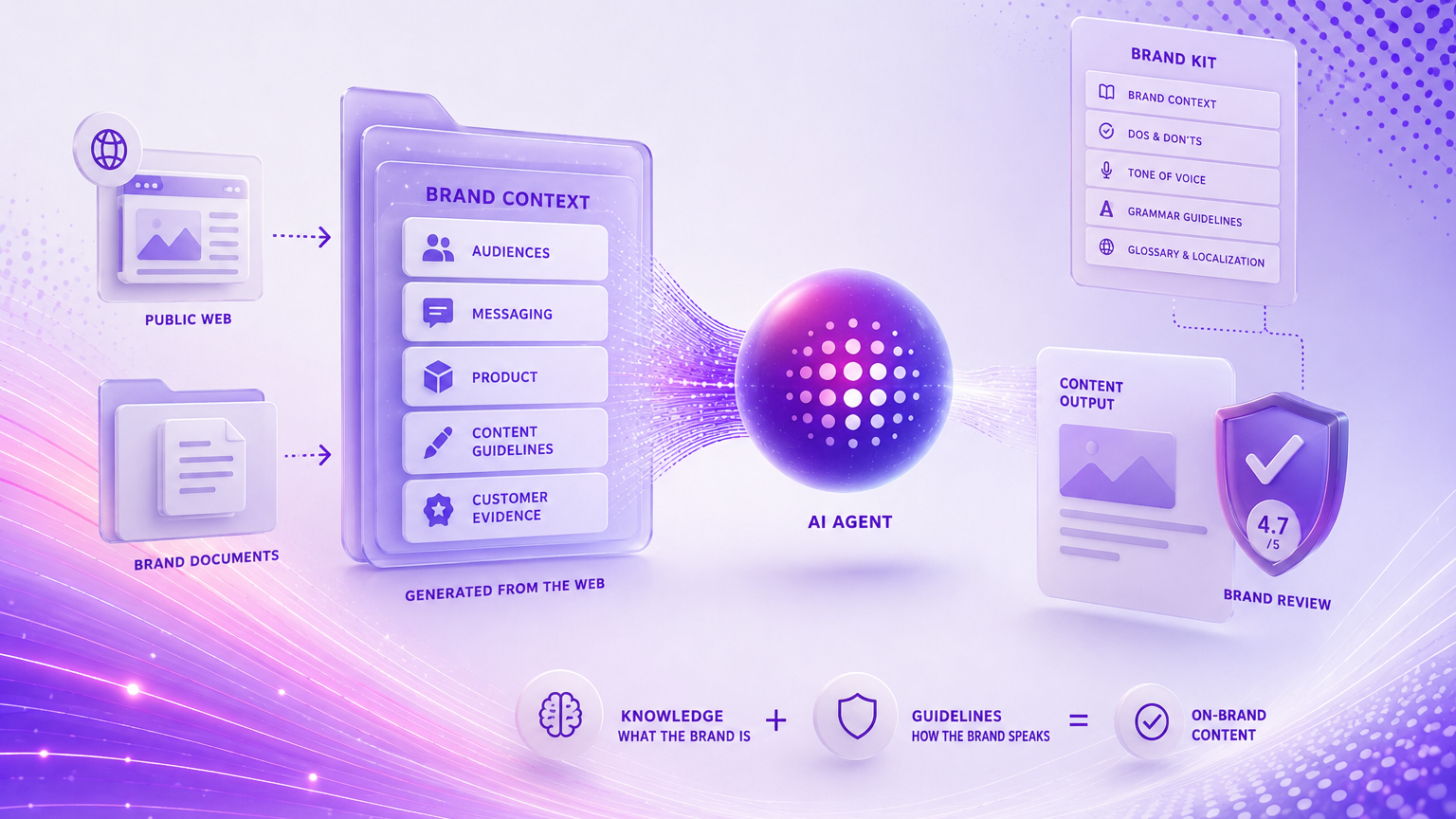
Content Hub's Brand Assistant is built on brand kits created in Sitecore Stream. You upload brand books, tone-of-voice guides, and campaign archives, Stream vectorizes them into brand knowledge, and you map the published kit to brands in Content Hub. From then on, generation and the brand-aware copilot work inside that context. You can run multiple kits for multiple brands, and recent updates let you pick the writing style (Formal, Casual, Bold, Informative, Friendly, or a custom one) on top of the kit's centrally defined tone. This is gated behind Stream Premium, which is a licensing fact you should price in early, not discover late.
4. What the smart features cost you at delivery
Delivery is where a DAM either disappears into the background or becomes a bottleneck. Look at CDN delivery, on-the-fly transforms, and cropping intelligence, and look at what the smart features cost you in processing.
Content Hub delivers through a CDN with renditions and media processing flows you can customize, including focal-point cropping driven by saliency detection rather than a naive center crop. The cost line to keep on your diagram is the embeddings rendition I mentioned: turning on visual search means every in-scope asset goes through extra processing and storage, and generating those embeddings bumps each asset's modified timestamp and lands in its processing history. That is not a reason to avoid it, just a reason to scope it (all assets, selected media, asset types, or specific collections) rather than flipping it on globally and being surprised by the reprocessing later.
5. Connecting is not the same as binding
The difference shows up the day you need an asset's metadata to drive something downstream, not just the file itself.
Content Hub's integration surface goes well past export. It connects natively into XM Cloud and SitecoreAI and into Experience Edge for delivery, it added a DAM connector for Contentful in early 2026 for teams that author elsewhere but want assets centralized, and it exposes REST and GraphQL plus the newer agent and MCP tooling that Sitecore is building out across the portfolio. If you already live in the Sitecore ecosystem, this native binding is the single biggest reason the evaluation tips toward Content Hub, because the asset stops being a file you fetch and becomes an entity your experiences and your agents can reason about.
6. Who actually runs this
The last axis is the one finance asks about and architects forget. A DAM you cannot staff is a DAM you will under-use.
Content Hub is not only a DAM. It carries content marketing, marketing resource management, and product content management, structured workflows, and an analytics layer that went generally available in early 2026 with system insights and content effectiveness reporting (views, top and bottom assets, geographic and device breakdowns on shared links). That breadth is the point for some organizations and overkill for others. Either way, the AI sits behind a Sitecore Stream subscription, with the strongest features behind Stream Premium, and the platform rewards teams that can invest beyond the initial implementation. If you cannot, you will pay for capability you never switch on.
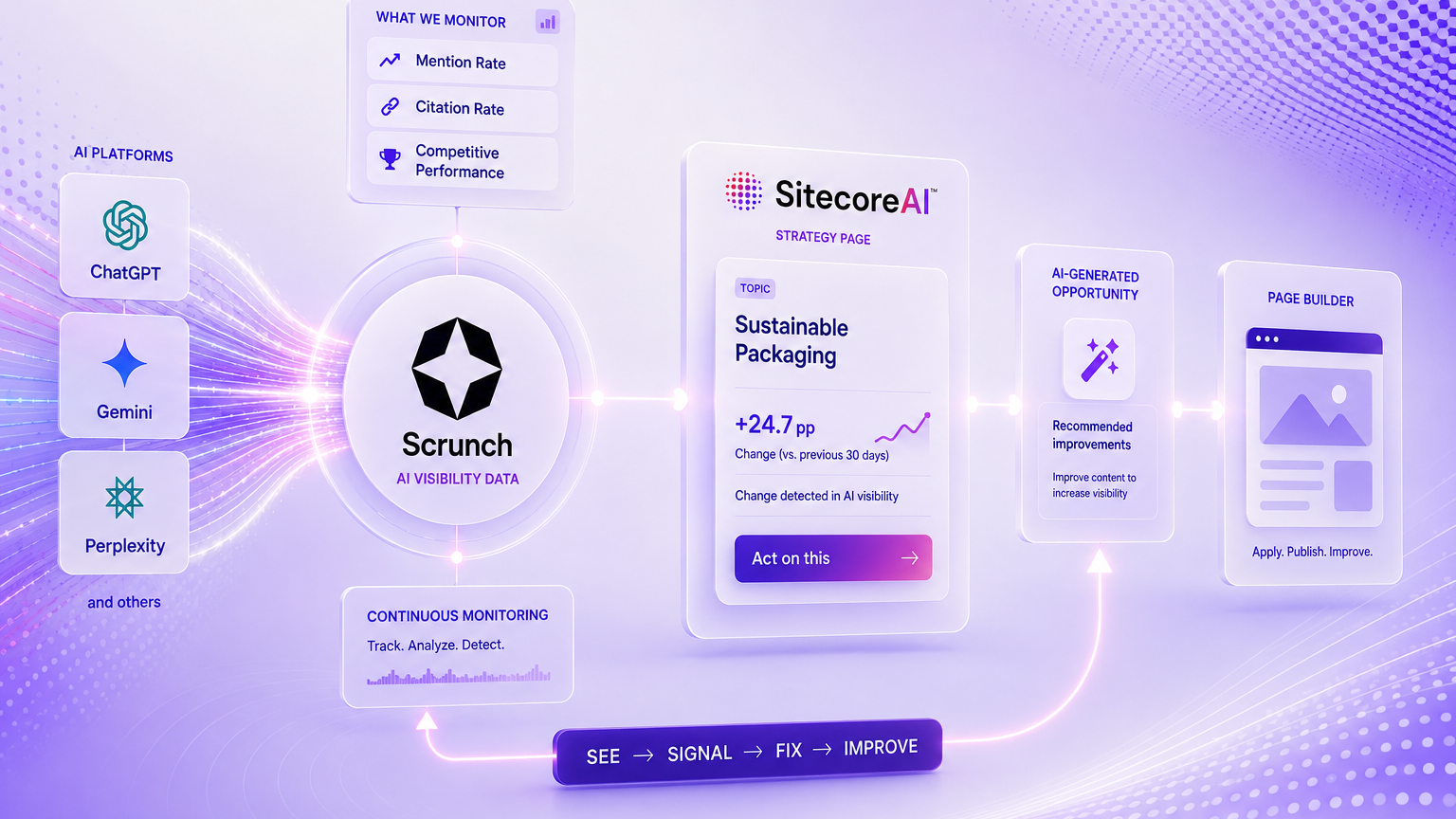
The structural picture
Here is the difference the six axes add up to, drawn simply.

And the grounding flow, which is the part the word "AI" hides on both sides.

How to use the framework
Score each axis for your context, then read the shape, not the total. Some patterns come up again and again.
A traditional standalone DAM is the right call when you are asset-centric and channel-agnostic, when avoiding platform lock-in is a stated goal, when cost sensitivity is high, or when you genuinely need a clean repository and nothing more. Do not buy an operations platform to solve a storage problem.
Content Hub DAM is the right call when you already run Sitecore or SitecoreAI, when your content work spans planning through delivery rather than stopping at the asset, when you want AI grounded in your taxonomy and brand instead of generic labels, or when multi-brand governance is a real requirement and brand kits map cleanly onto it. The native binding and the grounded AI are what you are paying for. If you would not use either, you are overbuying.
Where I would not overstate this
A few things the demo will skip, and that I would put on the table before signing.
AI alt text is English only today, and like any model output it needs a human pass before you treat it as an accessibility or compliance artifact. A confident wrong alt text is worse than none. The AI features are gated behind Sitecore Stream, and the brand features behind Stream Premium, so "Content Hub has AI" is partly a licensing statement, price it accordingly. Visual search embeddings add processing and storage, so scope them. The stock connector will not expose the image-policy thresholds unless you bring your own model. And the asset-browsing UX at very large scale is still a known friction point that long-time users raise. None of these is a dealbreaker. All of them are easier to plan for now than to discover in month three.
The bottom line
The honest framing of "Content Hub DAM vs. traditional DAM" is not a feature fight. It is two different questions wearing one label: repository or operations platform, and generic AI or grounded AI. A traditional DAM answers the first half of each pair very well and is often exactly right. Content Hub answers the second half, at the cost of a configurable model you have to staff and a subscription tier you have to license. Run your own context through the six axes and the choice usually makes itself. The mistake is letting a feature grid, where everyone passes, make it for you.
References
Official Sitecore documentation:
- AI in Content Hub (overview): https://doc.sitecore.com/ch/en/users/content-hub/ai-in-content-hub.html
- AI-assisted metadata enrichment: https://doc.sitecore.com/ch/en/users/content-hub/ai-assisted-metadata-enrichment.html
- Enable AI-assisted metadata enrichment: https://doc.sitecore.com/ch/en/users/content-hub/enable-ai-assisted-metadata-enrichment.html
- AI-assisted visual search: https://doc.sitecore.com/ch/en/users/latest/content-hub/ai-assisted-visual-search.html
- Configure brand kit integration: https://doc.sitecore.com/ch/users/latest/content-hub/configure-brand-kit-integration.html
- Create a brand kit in Sitecore Stream: https://doc.sitecore.com/stream/en/users/sitecore-stream/create-a-brand-kit-in-sitecore-stream.html
- Content Hub changelog: https://developers.sitecore.com/changelog/content-hub
From my own blog: