
Using Redis as Sitecore custom cache
In this post I'll share how to use Azure Redis Cache as Sitecore custom cache provider.
Azure Cache for Redis is a fully managed, distributed, in-memory cache that enables high-performance and scalable architectures. You can use it to create cloud or hybrid deployments that handle millions of requests per second at sub-millisecond latency, all with the configuration, security and availability benefits of a managed service. More info here.
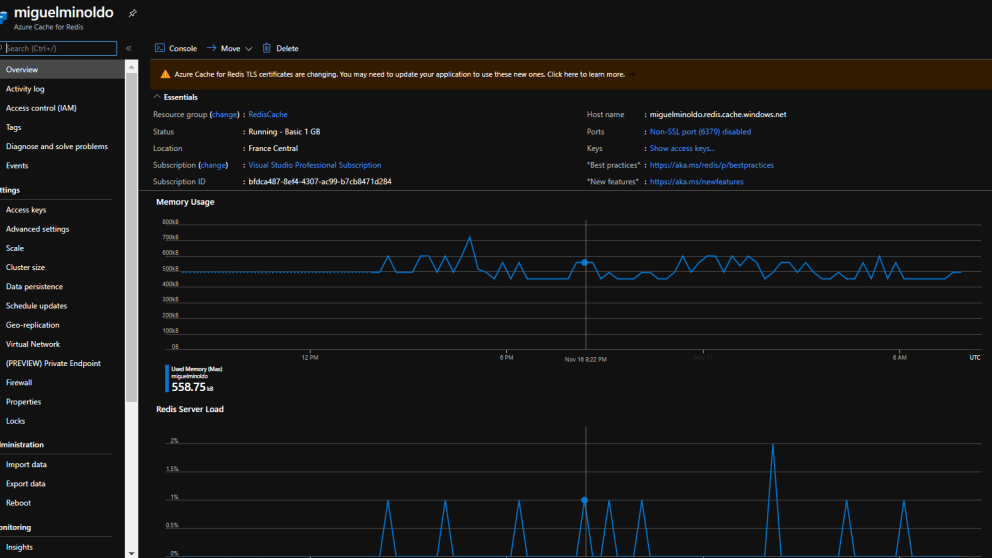
The first step is to create the Redis cache in Azure, for this we log in to the Azure Portal and then add a new resource, search for "Azure Cache for Redis" and choose a plan, for this demo I selected a "Basic C1" plan, we can scale it later if needed.

The next step is to get the connection string data and add a new entry "redis.sessions" into the connectionstrings.config file:


Now our app is connected to the Redis cache. Let's now have a look at a custom cache implementation.
We start by creating a cache provider:
1[Service(typeof(IRedisCacheProvider), Lifetime = Lifetime.Singleton)]2public class RedisCacheProvider : IRedisCacheProvider3{4 private static readonly Lazy<ConnectionMultiplexer> LazyConnection = new Lazy<ConnectionMultiplexer>(() =>5 {6 var connectionString = ConfigurationManager.ConnectionStrings["redis.sessions"].ConnectionString;7 var options = ConfigurationOptions.Parse(connectionString);89 options.AllowAdmin = true;10 options.SyncTimeout = 60000;11 options.ConnectRetry = 5;1213 return ConnectionMultiplexer.Connect(options);14 });1516 public static ConnectionMultiplexer Connection => LazyConnection.Value;1718 private readonly IDatabase _redisCache;1920 public RedisCacheProvider()21 {22 _redisCache = Connection.GetDatabase();23 }2425 public IDatabase GetRedisCache()26 {27 return _redisCache;28 }2930 public IServer GetServer()31 {32 return Connection.GetServer(Connection.GetEndPoints().FirstOrDefault());33 }34}
Now we need to a create a cache manager, that class will contain all the methods to call the cache and to communicate with Redis:
1[Service(typeof(ICacheManager), Lifetime = Lifetime.Singleton)]2public class CacheManager : ICacheManager3{4 private readonly IDatabase _redisCache;5 private readonly IServer _redisServer;67 public CacheManager(IRedisCacheProvider redisCacheProvider)8 {9 _redisCache = redisCacheProvider.GetRedisCache();10 _redisServer = redisCacheProvider.GetServer();11 }1213 private static readonly Dictionary CacheKeyDictionary = new Dictionary();1415 public object Get(string key)16 {17 return Get(key, string.Empty);18 }1920 public object Get(string key, string site)21 {22 var siteName = string.IsNullOrEmpty(site) ? Context.Site?.Name : site;23 var cacheKey = $"{siteName}{Context.Database?.Name}{Context.Language}{key}";24 var res = _redisCache.StringGet(cacheKey);2526 return !string.IsNullOrEmpty(res) ? JsonConvert.DeserializeObject(res) : res;27 }2829 public void Set(string key, object value)30 {31 Set(key, value, string.Empty);32 }3334 public void Set(string key, object value, string site)35 {36 var siteName = string.IsNullOrEmpty(site) ? Context.Site?.Name : site;37 var cacheKey = $"{siteName}{Context.Database?.Name}{Context.Language}{key}";3839 _redisCache.StringSet(cacheKey, JsonConvert.SerializeObject(value));40 }4142 public IList GetAllKeys()43 {44 return _redisServer.Keys().Select(k => k.ToString()).ToList();45 }4647 public void Remove(string key)48 {49 _redisCache.KeyDelete(key);50 }5152 public void ClearCache(object sender, EventArgs args)53 {54 Log.Info($"RedisCache Cache Clearer.", this);5556 _redisServer.FlushAllDatabases();5758 Log.Info("RedisCache Cache Clearer done.", (object)this);59 }6061 public TObj GetCachedObject(string cacheKey, Func creator) where TObj : class62 {63 return GetCachedObject(cacheKey, creator, string.Empty);64 }6566 public TObj GetCachedObject(string cacheKey, Func creator, string site) where TObj : class67 {68 if (string.IsNullOrEmpty(site))69 {70 site = Context.Site.Name;71 }7273 var obj = Get(cacheKey, site) as TObj;7475 if (obj == null)76 {77 // get the lock object78 var lockObject = GetCacheLockObject(cacheKey, site);7980 try81 {82 lock (lockObject)83 {84 obj = creator.Invoke();8586 Set(cacheKey, obj);87 }88 }89 finally90 {91 RemoveCacheLockObject(cacheKey, site);92 }93 }9495 return obj;96 }9798 private object GetCacheLockObject(string cacheKey, string site)99 {100 cacheKey += site;101102 lock (CacheKeyDictionary)103 {104 if (!CacheKeyDictionary.ContainsKey(cacheKey))105 {106 CacheKeyDictionary.Add(cacheKey, new object());107 }108109 return CacheKeyDictionary[cacheKey];110 }111 }112113 private void RemoveCacheLockObject(string cacheKey, string site)114 {115 cacheKey += site;116117 lock (CacheKeyDictionary)118 {119 if (CacheKeyDictionary.ContainsKey(cacheKey))120 {121 CacheKeyDictionary.Remove(cacheKey);122 }123 }124 }125}
It's important to keep in mind that this is a distributed cache, meaning that all Sitecore instances connected to the same cache are sharing it, for example, if we've a setup with one CM instance and two CDs, all of those will be sharing the same cache, while in memory cache is specific to the instance. That's why I'm adding the site name, database and language to the cache key.
Almost done, but now we have to think about one of the most important things when working with caches, when and how to invalidate those.
We can just call the ClearCache() on the publish:end and publish:end:remote events, but I wanted to make it a bit flexible, as the cache is shared across instances is better to keep control on that rather than just flushing everything on each publish action.
I decided to go with a custom event handler approach. Check the config patch, I'm introducing the customCache:rebuild and customCache:rebuild:remote events:
1<!--For more information on using transformations see the web.config examples at http://go.microsoft.com/fwlink/?LinkId=214134. -->2<configuration xmlns:patch="http://www.sitecore.net/xmlconfig/" xmlns:set="http://www.sitecore.net/xmlconfig/set" xmlns:xdt="http://schemas.microsoft.com/XML-Document-Transform">3 <sitecore>4 <pipelines>5 <initialize>6 <processor type="Foundation.RedisCache.Pipelines.Initialize, Foundation.RedisCache" method="InitializeFromPipeline" />7 </initialize>8 </pipelines>9 <commands>10 <command name="rediscache:cleancache" type="Foundation.RedisCache.Commands.CleanCacheCommand, Foundation.RedisCache" />11 </commands>12 <events xdt:Transform="Insert">13 <event name="customCache:rebuild">14 <handler type="Foundation.RedisCache.Events.EventHandlers.CacheRebuildEventHandler, Foundation.RedisCache" method="OnCustomCacheRebuild" />15 </event>16 <event name="customCache:rebuild:remote">17 <handler type="Foundation.RedisCache.Events.EventHandlers.CacheRebuildEventHandler, Foundation.RedisCache" method="OnCustomCacheRebuild" />18 </event>19 </events>20 </sitecore>21</configuration>22
The initialize pipeline:
1public class Initialize2{3 ///4 /// Initializes event subscription5 ///6 /// Args7 public virtual void InitializeFromPipeline(PipelineArgs args)8 {9 var action = new Action(RaiseRemoteEvent);1011 Sitecore.Eventing.EventManager.Subscribe(action);12 }1314 ///15 /// Raises remote event16 ///17 ///18 private void RaiseRemoteEvent(CacheRebuildEvent cacheRebuildEvent)19 {20 var eventArgs = new object[] { new CacheRebuildEventArgs(cacheRebuildEvent) };2122 Sitecore.Events.Event.RaiseEvent(Constants.CustomCacheRebuildEventNameRemote, eventArgs);23 }24}
I've also decided to create a simple command that we can just call from the Sitecore ribbon in order to flush this cache manually, this can help in case something get wrong and to avoid the need of manually flushing the redis cache from Azure.
1[Serializable]2public class CleanCacheCommand : Sitecore.Shell.Framework.Commands.Command3{4 public override void Execute(Sitecore.Shell.Framework.Commands.CommandContext context)5 {6 var raiser = new CacheRebuildEventRaiser();7 var ev = new CacheRebuildEvent { CacheKey = Constants.ClearAll };89 raiser.RaiseEvent(ev);1011 SheerResponse.Alert("Redis Cache flushed");12 }13}
That's very much it! Let's see this in action now!
So, to make use of this caching foundation, we just need to inject the ICacheManager and use the GetCachedObject method:
1var cacheKey = $"RedisCacheTest-{path}";23 return _cacheManager.GetCachedObject(cacheKey, () =>4 {5 var slowMe = DateTime.Now + TimeSpan.FromSeconds(5);67 while (DateTime.Now < slowMe)8 {9 //This is just an expensive operation...10 }1112 return "/some/url";13 });
Please note that at the end the cache key will be generated by: {Site Name}{Database Name}{Language Name}{RedisCacheTest}-{path}.
Let's check now the Redis Cache Console in Azure, we can run the command SCAN 0 COUNT 1000 MATCH * to get all keys from the cache:

Let me take the opportunity to introduce the Redis Cache Visual Code extension, find the details here.

The extension provided a quick and easy way to browse the Redis cache contents,
I hope you find this interesting!
You can find the full code in Github.